Description
MemAlloc is a free memory allocation tool. It allows you to stress and test your Windows operating
system by requesting any amount of memory you want. This program is now freeware!!!
Compatibility matrix
| Windows NT |
Windows 2000 |
Windows XP |
Windows 2003 |
Windows Vista |
Windows 7 |
Windows 8 |
| Yes |
Yes |
Yes |
Yes |
Yes |
Yes |
Yes |
Usability
You can use "MemAlloc" memory allocation program to:
- Put a stress on your Windows system for benchmarking reasons
- Easily simulate a heavy memory load (which usually appears while you are using
simultaneously several big programs, games, etc)
- Determine hardware (memory) requirements for some specific software environments
- Test defective hardware
- Test performance of specific hardware
- Compare behavior of different operating systems in heavy memory load conditions
- Test recoverability capacity and time after a heavy memory load of your operation system
- Consume all Windows OS available memory to test the behavior of other programs when Windows OS is low in memory
- Display real time information about your system resources usage:
- Total RAM
- Total virtual
- Available RAM
- Total page file
- Memory load
- Avail page file
The program will refresh the system resources usage values at every second.
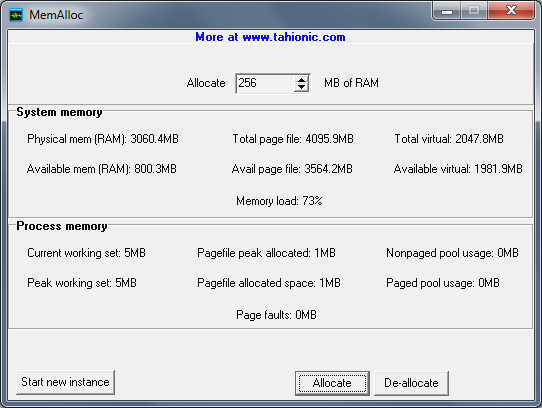
Experiment - Heavy memory load simulation
In this experiment we will set the MemAlloc program to allocate 1.030GB of RAM, while the test computer has only 1023.4GB of installed physical RAM memory.
After pressing the ‘Allocate’ button
(fig. 1), the MemAlloc program shows not only that Windows is return to give the requested memory, but also it has some extra free memory (about 22MB) available.
How is this possible?
When MS
Windows is low in memory, it will "download" some of the running programs to disk, using their memory for other more urgent purposes. This process is called "swapping".
This way it creates the impression that the amount of available memory (called "virtual memory") is higher than the real amount of memory installed in your computer. This
is an ingenious solution but it is not perfect, because swapping other programs to disk is very slow.

How does it work?
The MemAlloc memory allocation program will requests from Windows OS the specified amount of memory. This amount can be defined in chunks of 1MB.
This program is now freeware!!!

MemAlloc is delivered in a package to together with several other graphics programs. Once unpacked, it does not require being installed. Just double click the program to run it.
NOTE:
- Our software doesn't install any (DLLs, ActiveX, DirectX, .Net, Java, Windows services packs, IE updates, etc) crapware in your computer!
- Our software is monolithic and portable - which means that you can copy it on a flash stick and run it on any computer without installing it.
Similar programs
You may want to see also:
|
DOS Delay
|
This is a DOS command that will execute a delay. Useful in batch files (BAT/CMD). Free. |
|
File generator
|
File Generator can generate a specified number of files. You can specify the size of the file, content of each file and the file name pattern. |
|
Hardware IDExtractor
|
This program shows data about your computer's hardware: Hard drive ID (unique hardware ID written in drive's chip), partition ID, CPU ID (unique hardware ID), CPU vendor, CPU speed, data about physical RAM |
Other programs
CopyTextFromTo
NFO viewer
Clipboard helper
Genial renamer
Painless image resizer
Screen ruler
Daily backups
System tray timer
CPU core overload
Get my IP
Power email address extractor
Web site down
HTML "Alt" tag generator
Word Extractor
|